Preggers: Pregnancy & Baby App
- 4.9
- Rating
- 100.00K
- Installs
- Free
- Price

 Analysis by App-foxy
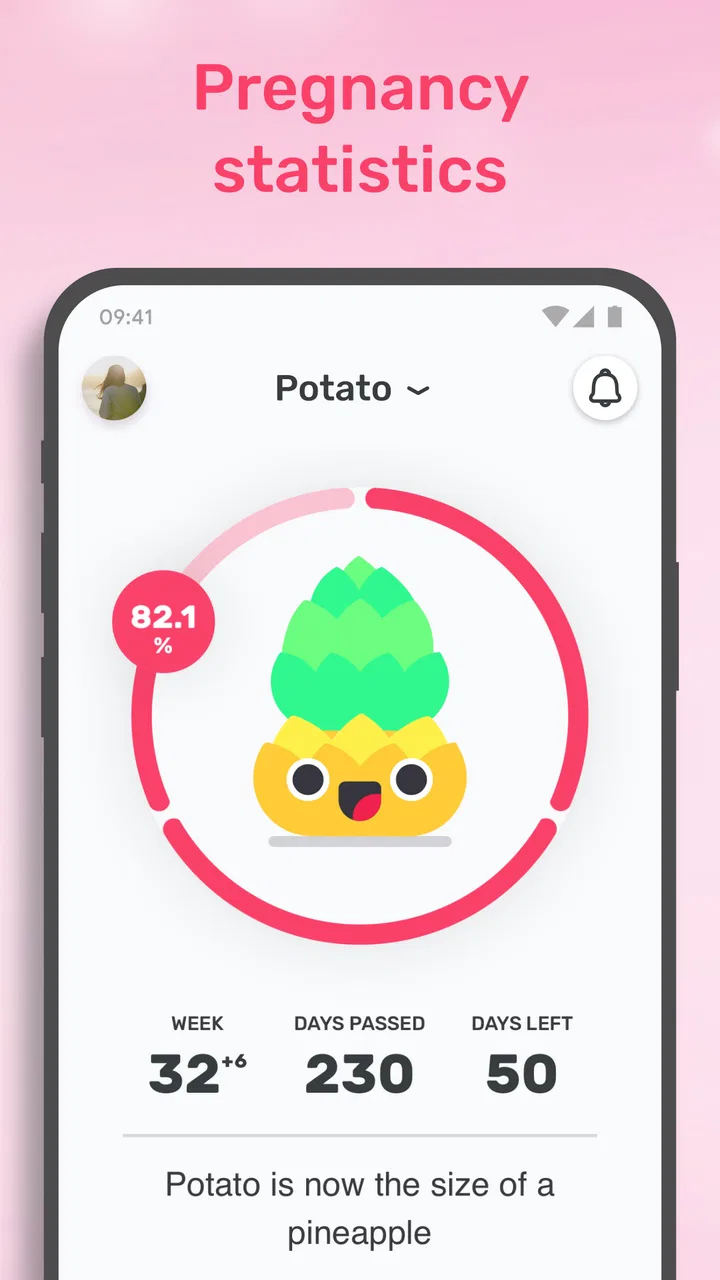
Pregnancy apps often try to do too much at once, but Preggers: Pregnancy & Baby App has one especially useful idea at its center: turning the baby’s growth into something easier to picture. Its 3D baby-size view and fruit comparisons give a changing pregnancy a visual reference, while the surrounding tools add practical support through checklists, name browsing, and training content. I found that combination more helpful than a simple week counter because it gives me a reason to open the app beyond checking how far along the pregnancy is.
Preggers is a free parenting app from Stroller AB, available for everyone and suitable for people using an Android device running version 6.0 or later. It has reached over 100 thousand installs and holds a 4.9 average from around 1.6 thousand ratings, which suggests that its friendly presentation has connected with many users. The app was released on February 10, 2022, and its current version is 3.11.1. Optional purchases range from $0.99 to $84.99 per item, so the free starting point is attractive, but anyone considering extras should pay attention to what is included before buying.
Why the visual size comparison matters
The most memorable part of Preggers is the way it presents fetal growth through a 3D model and familiar fruit comparisons. A medical explanation can be accurate yet difficult to imagine, especially when the numbers change gradually from one stage to the next. Seeing a visual representation gives the information a more immediate shape. The fruit comparison adds a lighter, everyday reference that can make a weekly update easier to discuss with a partner or family member.
You May Also Like

 Blood Strike: 2.5 Anniversary
Blood Strike’s Loadouts Turn Every Drop Into a Tactical Gamble
A close look at Blood Strike’s custom loadouts: how fast access to signature weapons reshapes its battle royale rhythm, rewards preparation, and narrows the gap between fights.

 Pandora - Music & Podcasts
Pandora’s Music Is Easy to Start, but Harder to Recover
Pandora’s strength is its low-effort path from a seed to a station. Its weak spot is how much confidence it asks you to place in connection, setup, and quiet recovery.

 8 Ball Pool
 Is Built on Rivalries, Rematches, and Routine
A close look at the rivalries, rematches, shared routines, and unanswered safety questions that turn a quick pool match into a persistent mobile community.

 Samsung Music
’s Quiet Strength Is Playing What You Already Own
Its reach comes less from spectacle than from dependable access to a personal library. That simplicity is both the app’s strongest retention engine and its ceiling.

 AccuWeather: Weather Radar
AccuWeather Review: A Quick, Clear Forecast for Everyday Decisions
For everyday plans, the best forecast is the one you can understand quickly. AccuWeather makes rain timing, radar, and local conditions easy to act on, with a few trade-offs.

 Hill Climb Racing
Why Hill Climb Racing Still Turns Crashes Into One More Run
A tiny car, a bumpy hill and one more upgrade: Hill Climb Racing keeps resurfacing because its simple chaos makes every near-miss feel personal.
More From Our News Desk



I do not see this feature as a replacement for clinical information. Its value is emotional and practical rather than diagnostic. It helps translate an abstract stage of pregnancy into a small moment of connection. Instead of opening an app only to read a paragraph, I can look at the model, understand the general idea of growth, and then decide whether I want to explore the other tools.
That distinction is important. The 3D presentation is not useful because it promises perfect precision; it is useful because it makes a broad developmental update easier to absorb. Pregnancy does not progress in exactly the same way for every person, so I would treat the fruit label and visual model as approachable illustrations, not as a measurement to compare against a scan or a clinician’s assessment.
The strongest feature here is not the novelty of a fruit comparison, but the way it gives a weekly check-in a clear purpose. For someone who feels overwhelmed by long articles or technical descriptions, that small visual anchor can make the app feel less demanding. It also gives partners who are not experiencing the physical changes a simple way to follow along without needing to understand every medical term.
Using the weekly view without overreading it
My advice is to use the size display as a conversation starter. Look at the current stage, notice how the illustration changes, and then use the rest of the app for planning or learning. I would avoid treating the fruit comparison as a promise about the baby’s exact size. That is the main mental adjustment needed to enjoy the feature without creating unnecessary worry.
This approach also makes Preggers different from a basic pregnancy calendar. A calendar is efficient when the only goal is to count weeks and dates. Preggers is better suited to someone who wants a more visual and encouraging check-in. The trade-off is that a richer presentation can feel less focused if all you want is a compact timeline and nothing else.
How the rest of the app supports that central experience
The Smart Checklist is the practical counterweight to the visual growth feature. Pregnancy can create a long stream of small tasks, questions, and preparations, and a checklist gives those thoughts somewhere to go. I find this more useful when I treat it as a planning surface rather than a command list. The point is not to complete everything immediately; it is to separate urgent actions from items that can wait.
A helpful workflow is to review the visual update first, then open the checklist while the pregnancy stage is fresh in mind. That makes the app feel like one short routine instead of several unrelated sections. I would scan the list, choose only the tasks that fit my current situation, and leave the rest alone. This prevents the common problem of turning a supportive app into another source of pressure.
The checklist is also where Preggers can serve two people at once. The pregnant user may already have appointments, symptoms, and practical decisions in mind, while a partner may need a clearer idea of how to help. Looking at the same planning area can make support more concrete. Rather than asking vaguely what needs to be done, a partner can use the list to identify a useful task and take responsibility for it.
Names and training add different kinds of value
The trending names section is less essential than the growth view or checklist, but it gives the app a softer, more personal side. Browsing names can be enjoyable during quiet moments, particularly when two people want to compare preferences without committing to a final decision. I would use it as an idea generator rather than a source of authority. Trends can inspire a shortlist, but they should not decide a family’s choice.
The training content serves a different need. It makes Preggers more than a passive information feed by giving users a way to think about activity during pregnancy. The useful question is not whether a routine looks appealing in isolation, but whether it fits the user’s energy, experience, and advice from a healthcare professional. Anyone dealing with discomfort, restrictions, or a complicated pregnancy should be especially careful about treating general training guidance as personal medical instruction.
That is one of the app’s less obvious trade-offs: its broad usefulness comes from combining emotional, organizational, and activity-related tools, but those areas require different levels of judgment. A fruit illustration can be enjoyed casually. A checklist may need personal prioritization. Training content deserves the most caution because physical activity is not equally appropriate for everyone.
A realistic everyday way to use Preggers
Imagine opening the app on a quiet evening after a busy day. I would begin with the 3D baby view and fruit comparison, not because I need another exact number, but because it offers a quick sense of where the pregnancy is in its overall journey. I might show the illustration to my partner, then move to the Smart Checklist and select one practical task for the coming days. If there is still time, I could browse names together or look at the training section for ideas to discuss later.
That routine works because it stays short and gives each part a role. The visual feature creates connection, the checklist turns attention into action, and the optional sections provide exploration when there is enough energy for them. I would not try to read everything in one sitting. Pregnancy already produces a lot of information, so a small repeatable habit is more realistic than attempting to master the entire app.
Another useful scenario is sharing the app with a partner who feels unsure how involved to be. The 3D model makes the pregnancy easier to picture, while the checklist can turn general concern into a specific contribution. A partner might not know which preparation matters most, but reviewing the list together can lead to a simple agreement about what to handle next. This is a stronger use of the app than merely scrolling through weekly comparisons.
For someone preparing for a first baby, the checklist can also help reveal how many decisions exist without requiring all of them to be made at once. I would use it to create a rough sequence: things to discuss, things to research, and things to leave until later. That is a practical benefit that is easy to miss when focusing only on the colorful growth presentation.
Where the experience falls short
The visual style will not suit everyone. Some people want pregnancy information presented in a calm, clinical format, and the fruit comparisons may feel too playful for their taste. If I were looking for detailed medical reference material, I would prefer a trusted healthcare source or a dedicated clinical resource alongside the app. Preggers works best as a companion, not as the only place to answer serious health questions.
The broad feature mix can also create distraction. Names, training, checklists, and growth illustrations appeal to different moods, but not every user needs all of them. Someone who wants a minimal week tracker may find the additional sections unnecessary. In that case, a simpler calendar app could be more efficient, even if it lacks Preggers’ visual appeal.
The free entry point is another reason to try it, but the presence of in-app purchases means I would review any optional purchase carefully. The range extends from $0.99 to $84.99 per item, which is a substantial difference between the least and most expensive options. I would start with the free experience, decide whether the central visual and planning tools genuinely fit my routine, and only then consider extras.
There is also a psychological limitation to weekly comparisons. A user who becomes anxious about whether their pregnancy matches an illustration may find the feature counterproductive. Growth is not a competition, and a fruit label can simplify a complex process. I would recommend stepping away from comparisons if they create worry and using the app mainly for organization and gentle engagement instead.
The training area deserves the same balanced treatment. It can be a useful prompt for staying active, but it should not override professional guidance or personal limits. The app is not the right choice as a standalone exercise authority. Its training material makes more sense when used as a starting point for questions and conversations, especially if a healthcare professional has already given specific advice.
Who will get the most from Preggers?
I think Preggers is a strong fit for expectant parents who want pregnancy tracking to feel visual and approachable rather than purely numerical. It is particularly appealing to people who enjoy seeing progress represented in a friendly way and who also want a checklist nearby for practical preparation. Partners may benefit more than they expect because the 3D view and fruit comparisons make it easier to engage with the pregnancy’s changing stages.
It is also well suited to users who want several lightweight tools in one place. The combination of growth visuals, planning, names, and training means I can move from emotional connection to practical preparation without switching between separate apps. That convenience matters during a period when attention and energy can vary from day to day.
I would recommend looking elsewhere, or using Preggers only as a supplement, if the main priority is detailed medical education, highly specialized exercise guidance, or an extremely stripped-down calendar. The app’s strength is its approachable blend, not depth in one professional discipline. A clinician remains the better source for personal health decisions, and a minimalist tracker may be preferable for someone who dislikes extra sections.
For most new parents, the best way to judge it is to use the free version as a small weekly ritual. Check the visual growth feature, test whether the Smart Checklist actually helps with real tasks, and ignore sections that do not match your needs. If the app makes pregnancy easier to picture and preparation easier to organize, it is doing its job. If the illustrations feel distracting or the broader tools add noise, there is no reason to force the experience.
My final view after using its main tools
Preggers succeeds because it gives pregnancy tracking a human scale. The 3D baby representation and fruit comparisons are simple ideas, but they make a regular check-in more memorable and easier to share. The Smart Checklist then grounds that experience in everyday preparation, while the names and training sections give the app room to remain useful between practical tasks.
I would not rely on it for medical decisions, and I would be cautious with exercise guidance and visual size comparisons. Those limits do not undermine the app; they clarify its proper role. It is a supportive parenting companion, not a clinical replacement. The free starting point makes it easy to see whether its style suits you, while the optional purchases deserve a deliberate decision rather than an automatic upgrade.
My recommendation is strongest for people who want a warm, visual way to follow pregnancy and share the experience with a partner. If you prefer a bare timeline, a medical reference library, or a specialized fitness tool, another option may serve you better. For everyone in between, Preggers offers a thoughtful balance: use the visual growth feature for connection, the checklist for action, and the rest only when it genuinely helps.
FAQs for Preggers: Pregnancy & Baby App
01What features does the Preggers app offer for expecting parents?
The Preggers app provides a comprehensive suite of tools for expecting parents, including weekly pregnancy updates, a kick counter, contraction timer, and personalized checklists. It also offers expert advice on prenatal health, nutrition, and baby development, ensuring you stay informed and prepared throughout your pregnancy journey.
02Is the Preggers app available on both Android and iOS devices?
Yes, the Preggers app is available for download on both Android and iOS platforms. Users can find it on the Google Play Store for Android devices and the Apple App Store for iOS devices. This ensures that expecting parents can access its features regardless of their preferred operating system.
03Does the Preggers app require any in-app purchases or subscriptions?
While the Preggers app offers a variety of free features, there may be additional premium content available through in-app purchases or subscriptions. These offerings typically include advanced features, such as exclusive articles or in-depth guides, providing users with enhanced support throughout their pregnancy.
04How does the Preggers app ensure the accuracy of its information?
The Preggers app collaborates with medical professionals and experts in prenatal and postnatal care to ensure the accuracy of its content. Regular updates and reviews of the app’s information are conducted to maintain high standards and provide users with reliable and up-to-date advice.
05Can I customize the Preggers app to fit my specific pregnancy needs?
Yes, the Preggers app allows for customization to better suit individual needs. Users can input personal data, such as due date and pregnancy milestones, to receive tailored updates and advice. This personalized approach helps expectant parents stay informed about their unique pregnancy journey.
Pros
- Comprehensive week-by-week guidance.
- Customizable reminders for appointments.
- User-friendly interface for easy navigation.
- Access to expert advice and articles.
- Community support for sharing experiences.
Cons
- Limited features in free version.
- Occasional in-app ads can be distracting.
- Some information lacks depth.
- Requires internet for most features.
- No offline mode available for users.

Preggers: Pregnancy & Baby App
Gallery